Pixel-accurate sampling
A magnified loupe follows the cursor so you pick the exact pixel.
One click on any pixel on your screen. The color is on your clipboard before you let go of the mouse.
Pixel Drop lives in the menu bar and nowhere else. No window to manage, no document to save, no account to make. Press ⌘/ from anywhere and sample.
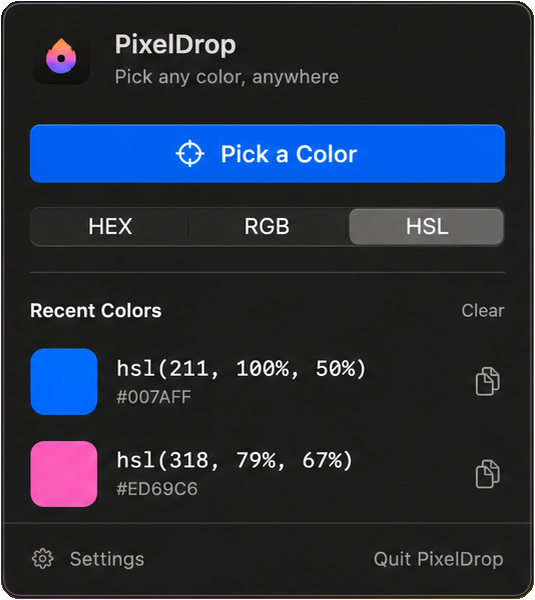 This is the whole interface.
A magnified loupe follows the cursor so you pick the exact pixel.
Choose the format you work in. The sampled color is converted locally and copied straight to the clipboard.
Your recent picks stay in the menu. Click one to copy it again, or clear the whole list in a click.
Press ⌘/ in any app to start picking without reaching for the menu bar.
One toggle. Pixel Drop is in the menu bar when you sit down, and it stays out of the Dock.
No accounts, no analytics, no network calls, no third-party SDKs. Sampling and conversion happen on device.
PixelDrop 1.0 is now available. Pick any color from your screen and copy it instantly.

First release. Menu-bar sampling with magnified loupe, HEX/RGB/HSL copy, local history, launch at login, and the ⌘/ global shortcut.
Pixel Drop supports full keyboard operation, VoiceOver labels on every control, Reduce Motion, and Increase Contrast. Color values are always shown as text, never by swatch alone.
Something unusable? Write to milano@greyinds.com and it gets priority.